
Blueprint projects
- Frontend
- Blueprint assignments
- Blueprint builders
- Blueprint general
- Blueprint how to
- Blueprint tools
- Backend
Files
Introduction
This feature allows you to attach files to any model using a polymorphic relation. Typically, on a production environment the files themselves are stored in an AWS S3 bucket. For local development you can configure your filesystem to store them locally.
Additionaly, files can be tagged in order to categorize them, add more info or whatever.
You can read more information about Laravel’s file storage here.
ERD
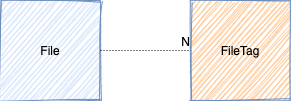
File
Attributes
id
The primary key which is stored as a UUID [char(36)].
fileable_id
UUID of the associated model [char(36)].
fileable_type
The type of the associated the model [char(255)].
The value should be the FQN of the associated model. In case you associate the file with a Blueprint model, then you should use the contract.
disk
The disk where the file has been stored [char(255)].
In most situations this will be local (local environment) or s3 (non-local environments).
is_public
Boolean to indicate if the file is publicly available [bool].
path
The path where the file has been stored relative to the disk’s “root” location [char(255)].
filename
The (original) filename [char(255)].
This should be filled with the original filename! When files are stored, the filename is the uuid without extension!
extension
The file extension [char(255)].
md5_hash
The md5 hash of the file contents [char(255)].
This can be used compare file data to see if a file has been changed.
mime_type
The mime type of the file [char(255)].
All above attributes are mandatory.
timestamps
The created_at, updated_at and deleted_at timestamps of the corresponding model’s created, updated and deleted events. [timestamp]
filepath
This is computed attribute and not added by default to the model’s attributes (nor stored in the database), only when requested with $file->filepath or when added to the transformer’s $fields array.
It basically is a helper for fetching the file from storage.
public_url
A computed attribute to get the public url for downloads. If the file was saved to a AWS S3 bucket as private, then it will return a pre-signed url which expires in a configurable amount of minutes (filesystems.temporary_url_expiration).
Methods
Relations
When using $model->relation() an Eloquent Builder object will be returned on which you can chain more queries. To get the model or collection of models, simply use $model->relation (without parenthesis).
fileable
Returns the associated model.
tags
Returns the tags associated with the file.
Traits
The files feature comes with 2 traits you can add to your model to define the relation with the File model.
HasFiles
This trait adds the MorphMany polymorphic files relation to the model having this trait.
The returned collection of File models is ordered descendingly by creation date. An additional interface has been made you can also implement to check if your model uses the trait.
$model instanceof HasFilesHasOneFile
This trait adds the MorphOne polymorphic file relation to the model having this trait and returns a File model. An additional interface has been made you can also implement to check if your model uses the trait.
$model instanceof HasOneFileRoutes
| Method | Endpoint | name | permission |
|---|---|---|---|
| GET | file/{file} | file.show | file.show, file.show.tenant |
| GET | file/{file}/download | file.download | file.show, file.show.tenant |
| POST | vapor/signed-storage-url | true |
file.show
Returns the (transformed) File model with the base64 encoded file contents included in the ‘file’ attribute.
file.download
Returns a file download.
vapor/signed-storage-url
This endpoint returns the uuid of the stored file in the AWS S3 bucket and an url where to post the file to.